Weather routing that understands how you sail
Tell Sereno about your boat, your limits and how you like to sail. It plans the passage on three forecast models at once, around land, reef and shallows, and shows you why the route goes where it goes.
Get Sereno Weather Routing, $250 a yearOr try it free until 31 December 2026 with a free svsabado.com membership
Know how much to trust the forecast
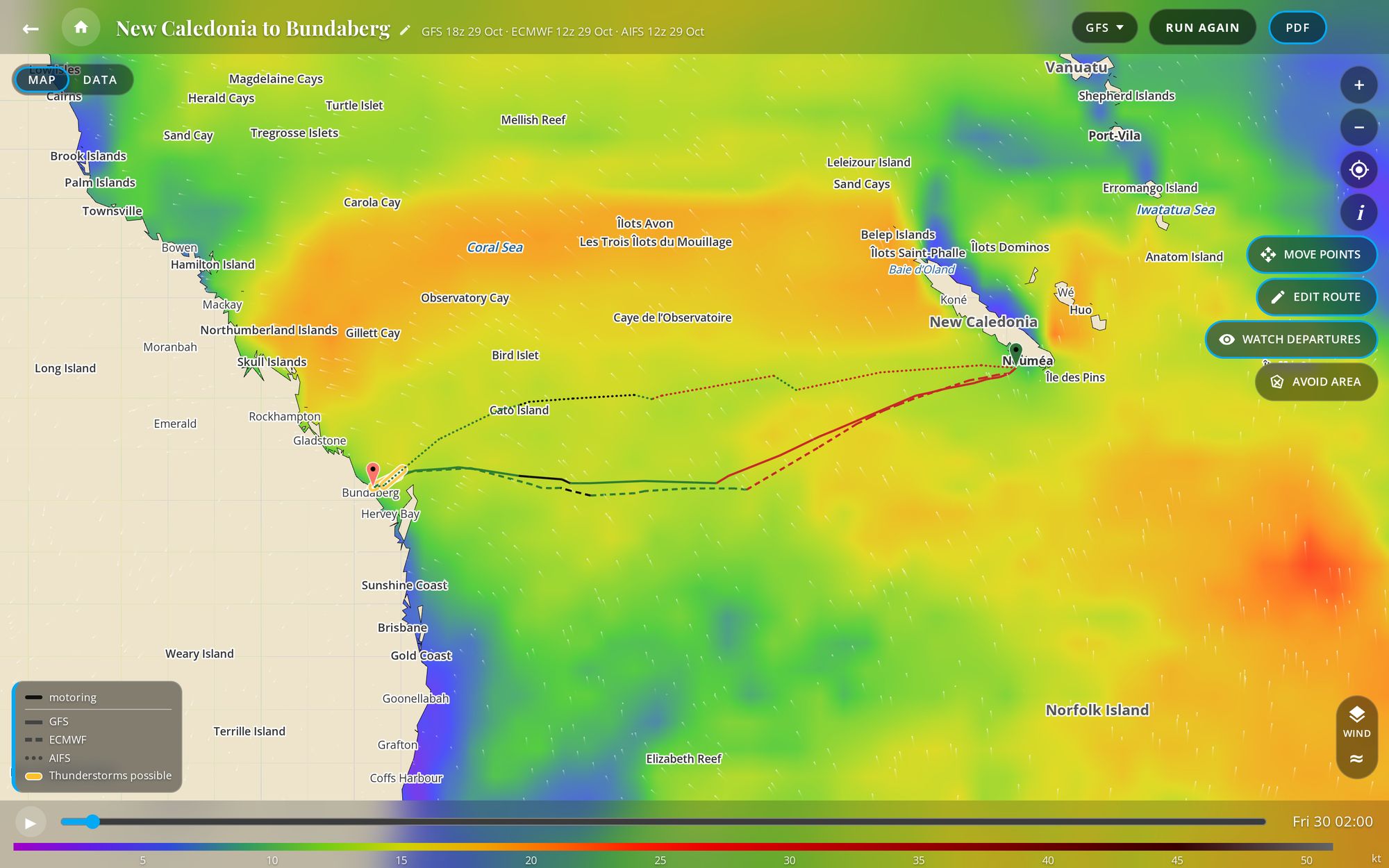
When three models agree, you can plan with confidence. When they don't, you see it before you leave. Every route runs on GFS, ECMWF and AIFS at once, side by side.
- GFS, the American model
- ECMWF, the European model
- AIFS, ECMWF's newest model, built with machine learning
The details
- Three forecast models
- GFS, ECMWF and AIFS (ECMWF's newest model, built with machine learning), refreshed as new runs arrive. Every screen shows which run you're looking at and how old it is.
- Weather map
- Wind and gusts (as streaks or barbs), pressure, rain, waves, CAPE, ocean current, infrared cloud, ASCAT, observed reports, disturbances and official storms, with a time slider to the end of the run and satellite imagery underneath when you zoom in. On a route, choose which model's weather the map shows, and tap a boat for its conditions.
- Your position
- On every app and screen, and the app asks for it only when you tap the position button.
- Weather forecasts
- Tap anywhere for the forecast at that spot, hour by hour and day by day: ten days of it, with rain chance from each ensemble, sunrise, sunset, the moon and tides.
- Storm signs
- Active tropical cyclones from NHC, JMA, JTWC and Nadi show on the map and are noted on routes they touch. Outlines of strong low-level spin are flagged too, and we're still checking that rule against real storms.
Choose the day, not only the route
Most of a passage's comfort and safety is decided by when you leave.
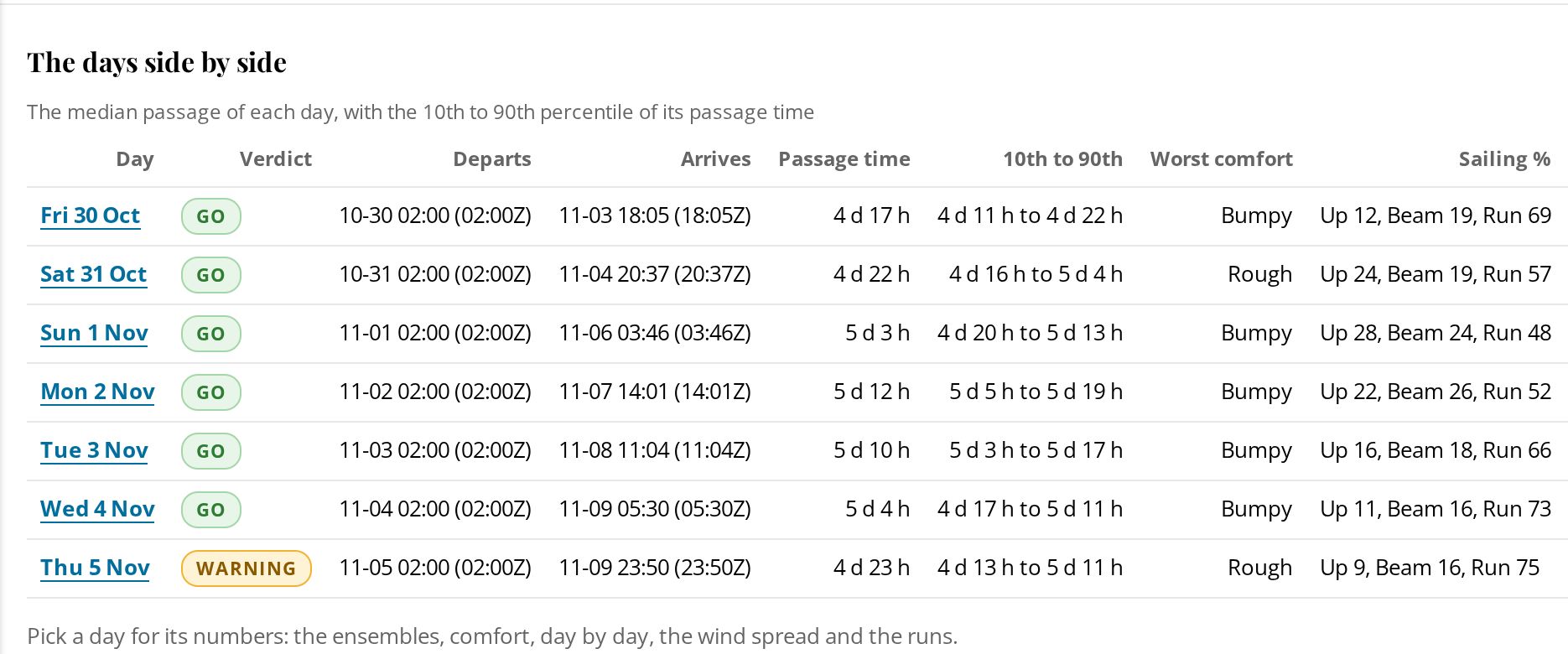
Departure days ahead, each marked Go, Warning or No. Sereno screens each day against the ECMWF and GFS ensembles, the full spread of each forecast, not a single run. Watch the days you're considering, and your phone lets you know when a verdict changes.
The details
- Departure planning
- Screen up to ten departure days at once. Each day is sailed by every member of the ECMWF and GFS ensembles on your boat's polar, then given a Go, Warning or No with the reason.
- Watching
- Watch a trip or one departure day. It's screened again automatically as each new ensemble run arrives, and the phone apps alert you when a watched day's verdict changes. Watch departures on a finished route starts a trip from it, keeping the route's own boat settings.
Understand why the route goes where it goes
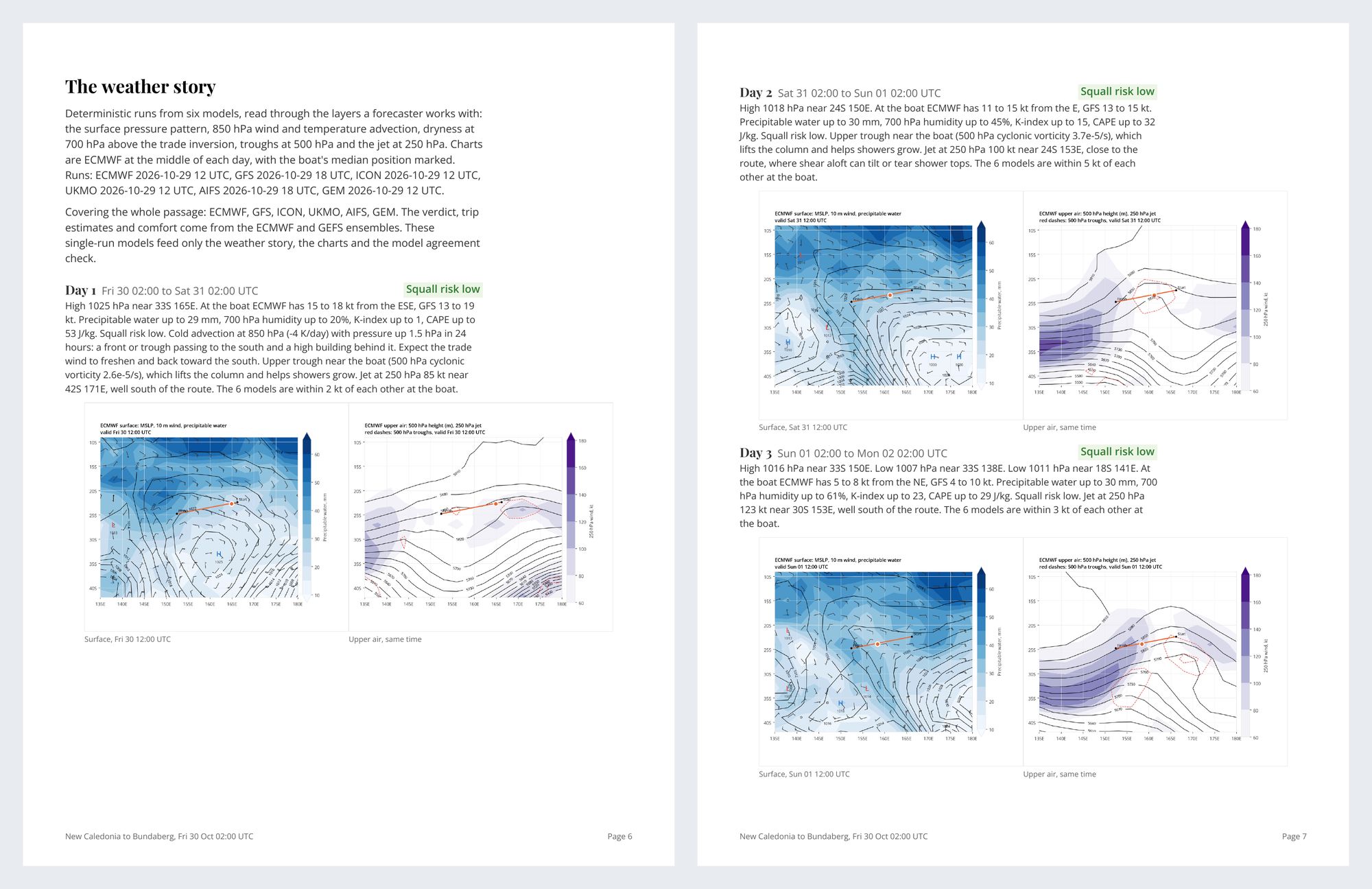
Understand why routes are the way they are. Sereno computes each route from the forecast models and your boat's own polar, and the passage brief follows written rules, so you can see the reasoning. The passage brief reads the forecasts of six models. The route itself is computed on three.
The details
- Passage brief
- The weather for the passage day by day, the official forecast, the sea, and how far the ensembles spread along your track. Every sentence comes from fixed rules on computed numbers, not AI, so the same weather gives the same words.
- Routes on all three models
- One request routes on GFS, ECMWF and AIFS side by side, so you can see where they agree and where they don't.
- Long passages
- Passages up to about 3,000 nm. Past the end of the forecast, the rest of the way is an estimate, drawn dashed, labeled, and based on climatology.
- When a route fails
- It names the cause, where it happened, and what to try: a waypoint, another departure, a finish outside the pass. A route that circles or zigzags is flagged with where and when.
Check the forecast against what the satellites measured
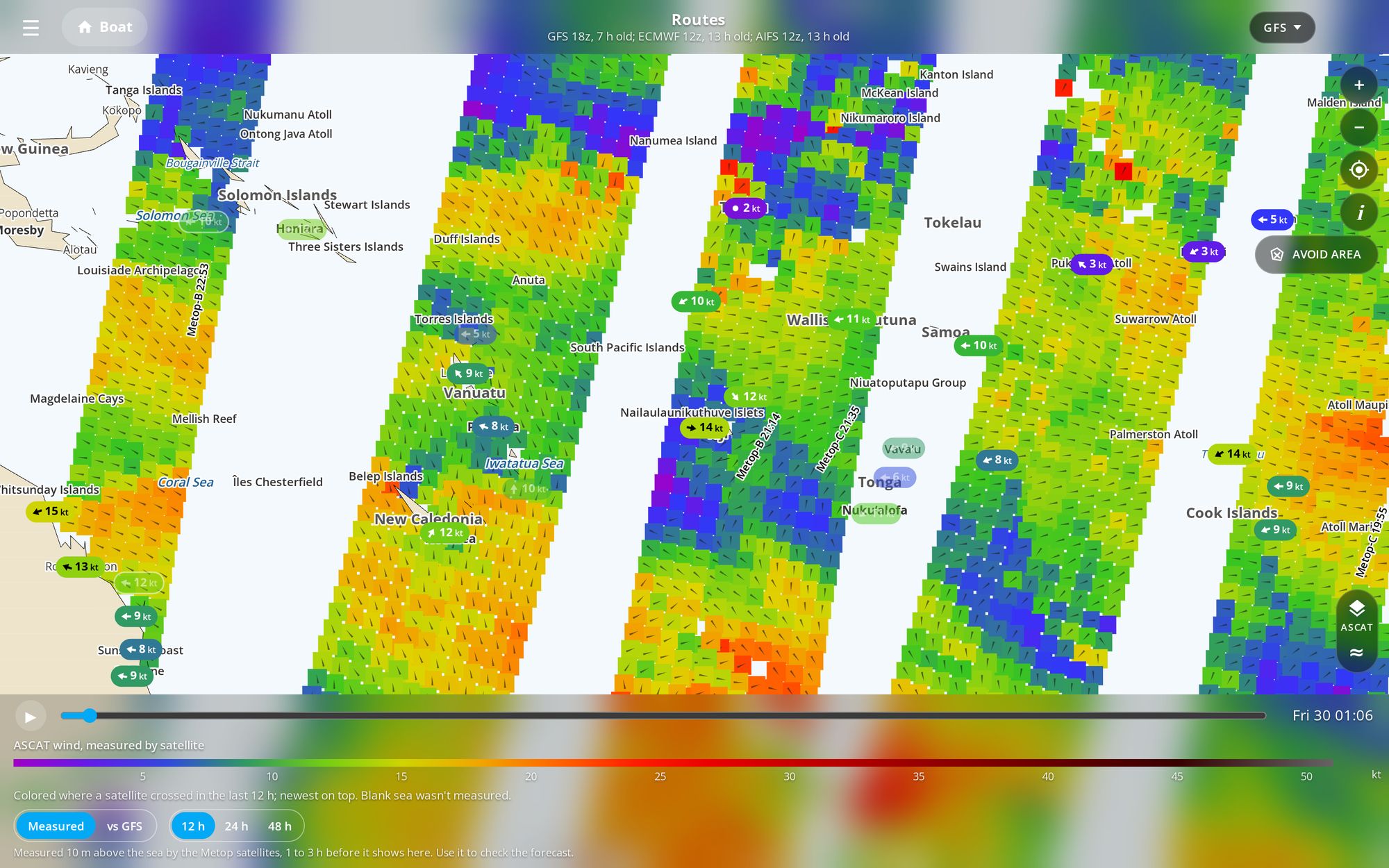
ASCAT shows the wind satellites measured over the last 12, 24 or 48 hours. Lay it over the forecast and see where the model has been right.
Live reports from stations and ships sit beside it.
The details
- ASCAT wind
- Wind that the Metop-B and Metop-C satellites measured over the last 12, 24 or 48 hours, with a view of where each model's forecast is stronger or weaker. Each spot is crossed about twice a day, and a pass appears one to three hours later. With the layer on, a tap anywhere on the map adds the nearest measurement and what the model on the map had there. Cells are blank in rain, readings are weak near the coast, and light-wind directions are uncertain. It checks the forecast and doesn't change a route.
- Observed wind
- Airport, buoy, coastal-station and ship reports from the last three hours, with the model's forecast for the same place and time beside each. Coverage is thin far offshore.
- Cloud
- Infrared cloud imagery under the weather map.
- Bulletins
- Official high seas bulletins in the route PDF, where the issuing service allows a copy.
Routes that respect the reef
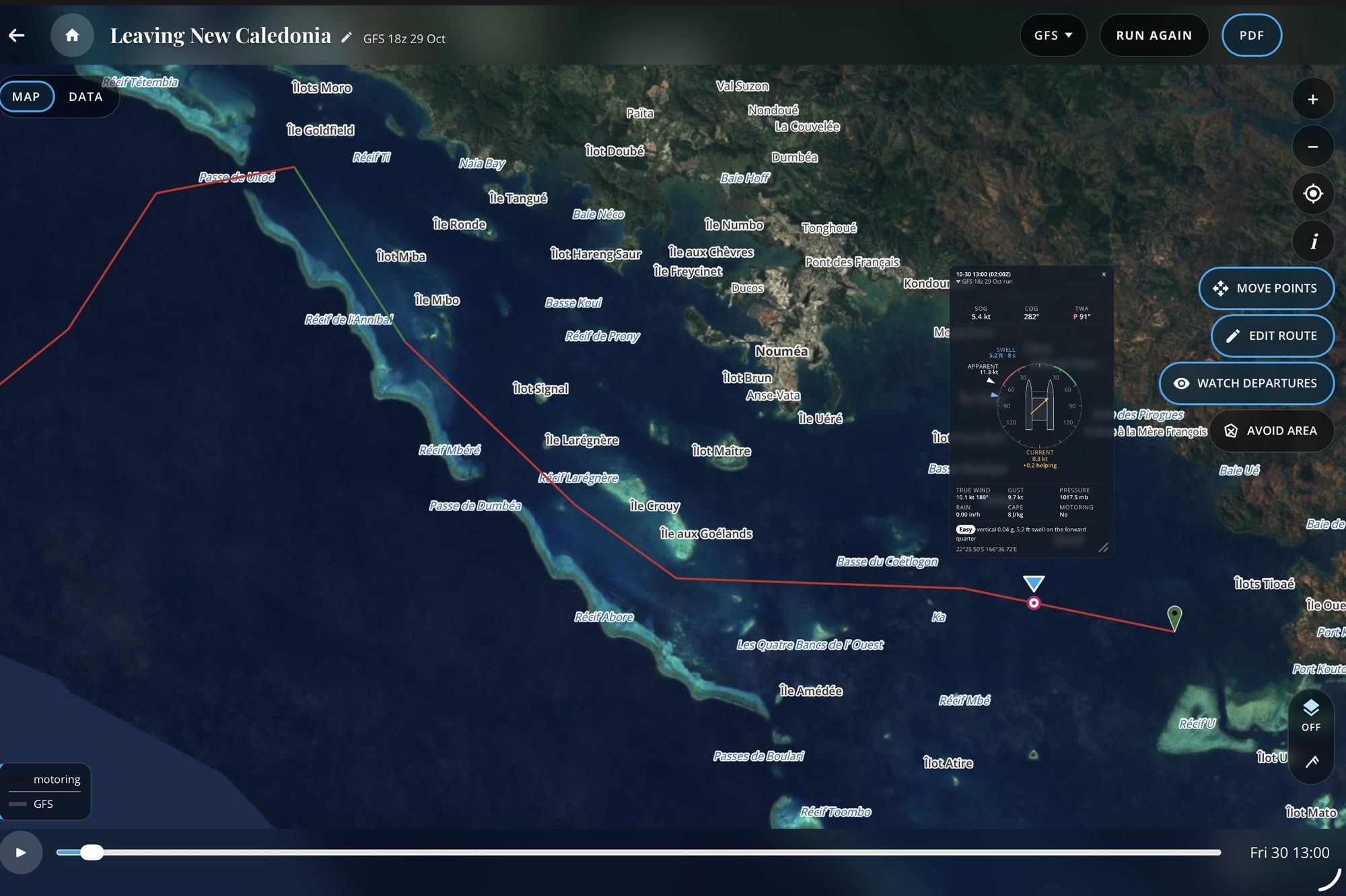
Sereno routes around the land, reefs and shallows in its data, and checks for named storms. Every route reminds you to check it against your charts, and that matters most near coasts where depth data is coarse. All routes must be verified using your navigational charts.
The details
- Land, reefs and shallows
- Routes go around coastlines, charted reefs and water shallower than your minimum depth, in Sereno's data.
- Waypoints and areas to avoid
- Add waypoints to route through a pass or round a cape: tap them onto the map and drag them, or type positions into the waypoint table. Draw no-go areas on the web map and every route keeps out of them. The phones show them on the map and list them.
- Storm check
- Before a route runs, it checks the official forecasts from NHC, JMA, JTWC and Nadi for a named storm near the straight line from start to finish. If one is close, the route stops before it starts and names the storm, with OK, View storm and Route anyway. The router doesn't steer around storms as we've found this to result in unrealistic routes.
- Ocean current
- Surface current is part of every route unless you turn off Use ocean current in Settings, and the table shows its set and drift along the way.
See the whole passage before you go
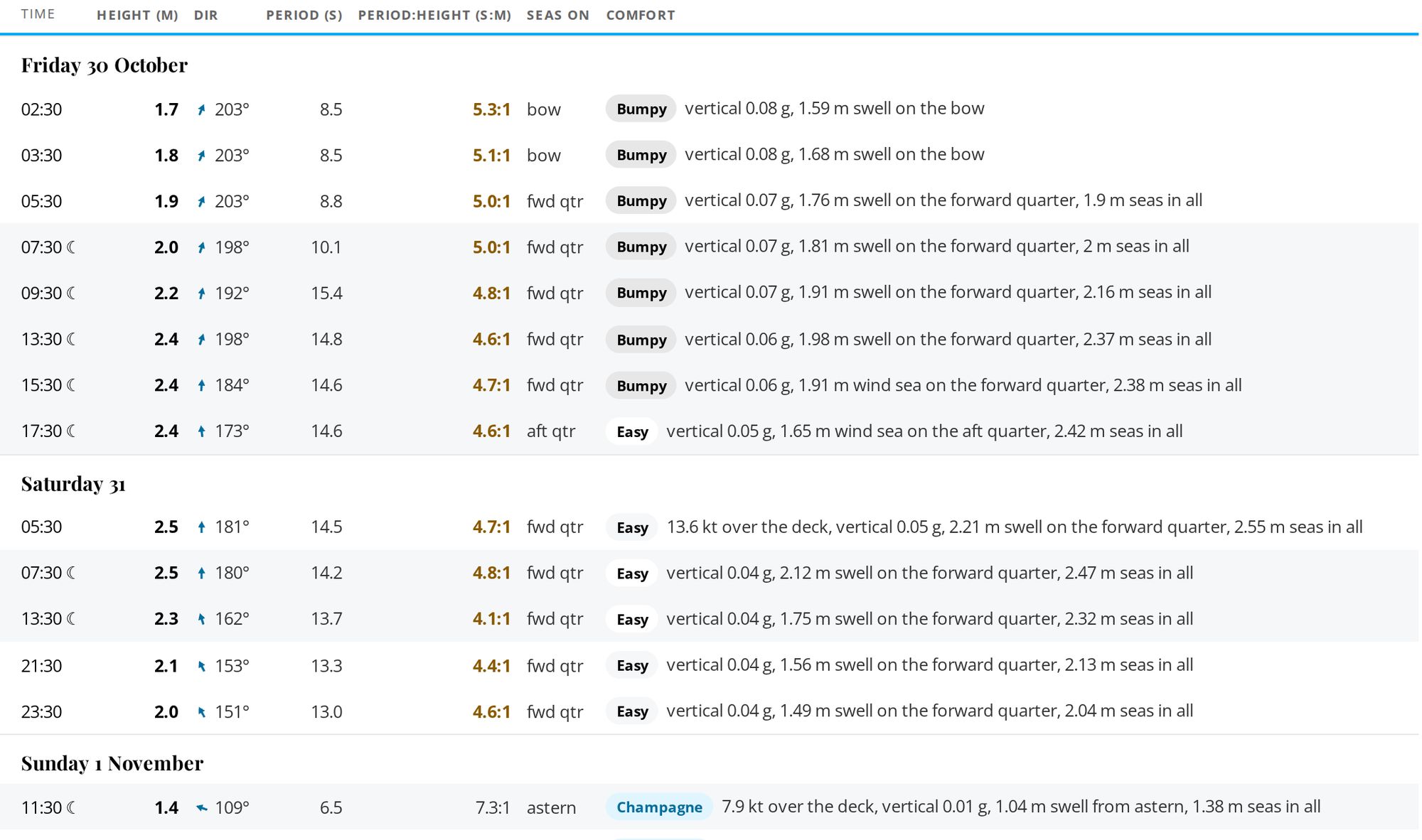
Every leg in a table, rated for comfort, with sea state, a summary, graphs and fuel.
The details
- Route table
- Every leg with time, position, course and speed, true and apparent wind, gusts, sail plan or motor, waves, current, rain and comfort.
- Comfort
- Each leg is rated Champagne, Easy, Bumpy, Rough or Sick from how your boat moves in the forecast sea (heave, pitch and roll against published seakeeping limits) and the wind over the deck, with the reason given.
- Sea state
- Wind sea and swell shown apart, the period to height ratio, and the side of the boat the seas arrive on.
- Summary, graphs and fuel
- Arrival, distance, time under sail and motor, tacks and gybes, strongest wind and highest sea for each model, charted along the passage. Enter your engine's fuel use and reports show what the route burns.
- Arrival
- The destination's weather on the arrival day, on its own tab.
- Times
- Local (your device's zone), UTC, or At the boat: each time on a route in the zone the boat is in then, with a row where the clocks change. A route keeps the choice it was made under, and a forecast at a point reads in that place's zone.
- Run again, Move points, Edit
- Rerun a route on newer weather, with its points moved, or with its settings changed, then keep it as a new route or replace the old one. Any route can be renamed, and an unnamed one is listed by its start and finish.
- Time limit
- A route finishes within 3½ minutes. Passages over 2,000 nm can take up to 8, and you can cancel one while it runs.
- Boat card
- Tap a boat on the map for its speed, heading, wind, seas on the boat, comfort and the current helping or against, at that moment of the route.
- Thunderstorm risk
- Legs where thunderstorms are possible or likely are marked on the route, from the models' instability and lift, with CAPE and K-index in the conditions box.
Made for a satellite connection
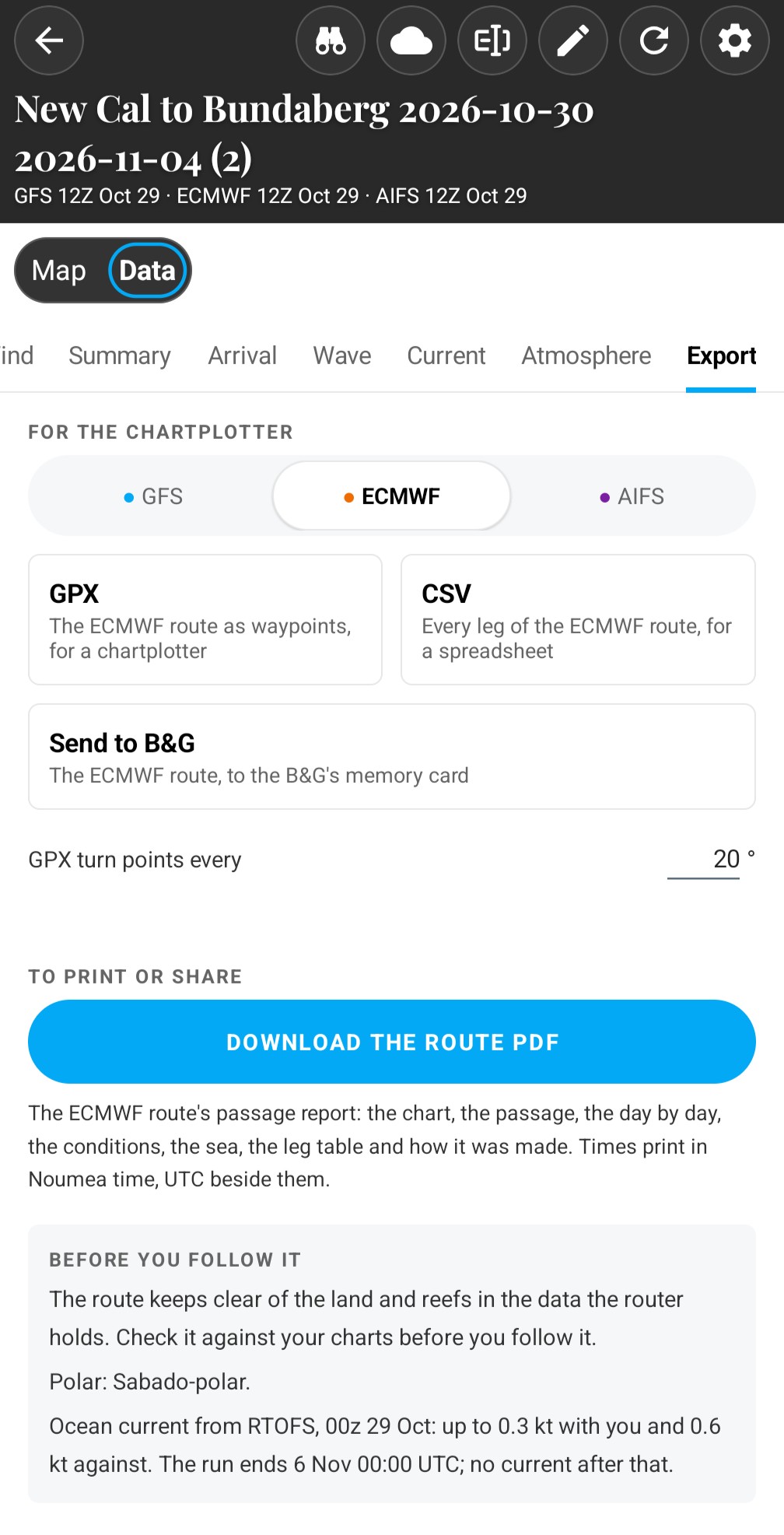
A 1,000-mile route on three models comes down in about 40 KB. Send it to a B&G plotter from your phone, or take it as PDF, GPX or CSV.
No retyping waypoints
Send to B&G, tested on a Zeus, puts the route on the plotter's memory card.
The details
- Slow links
- Map layers arrive in small packed pieces. A first window measured about 0.10 MB, against 1.03 MB before the change (2026-10-04). A 1,000 nm route on three models measured about 40 KB from the server to the device (2026-10-22). It's built for slow, metered links.
- Exports
- A PDF report with the day-by-day conditions, a GPX file for your chartplotter, and the route table as CSV with each point's latitude and longitude, each file named for the route and the model. On Android and iPhone, Send to B&G puts the GPX on a B&G plotter's memory card over the boat's WiFi. We've tested it on the B&G Zeus line of plotters.
Plan at the desk, check on deck
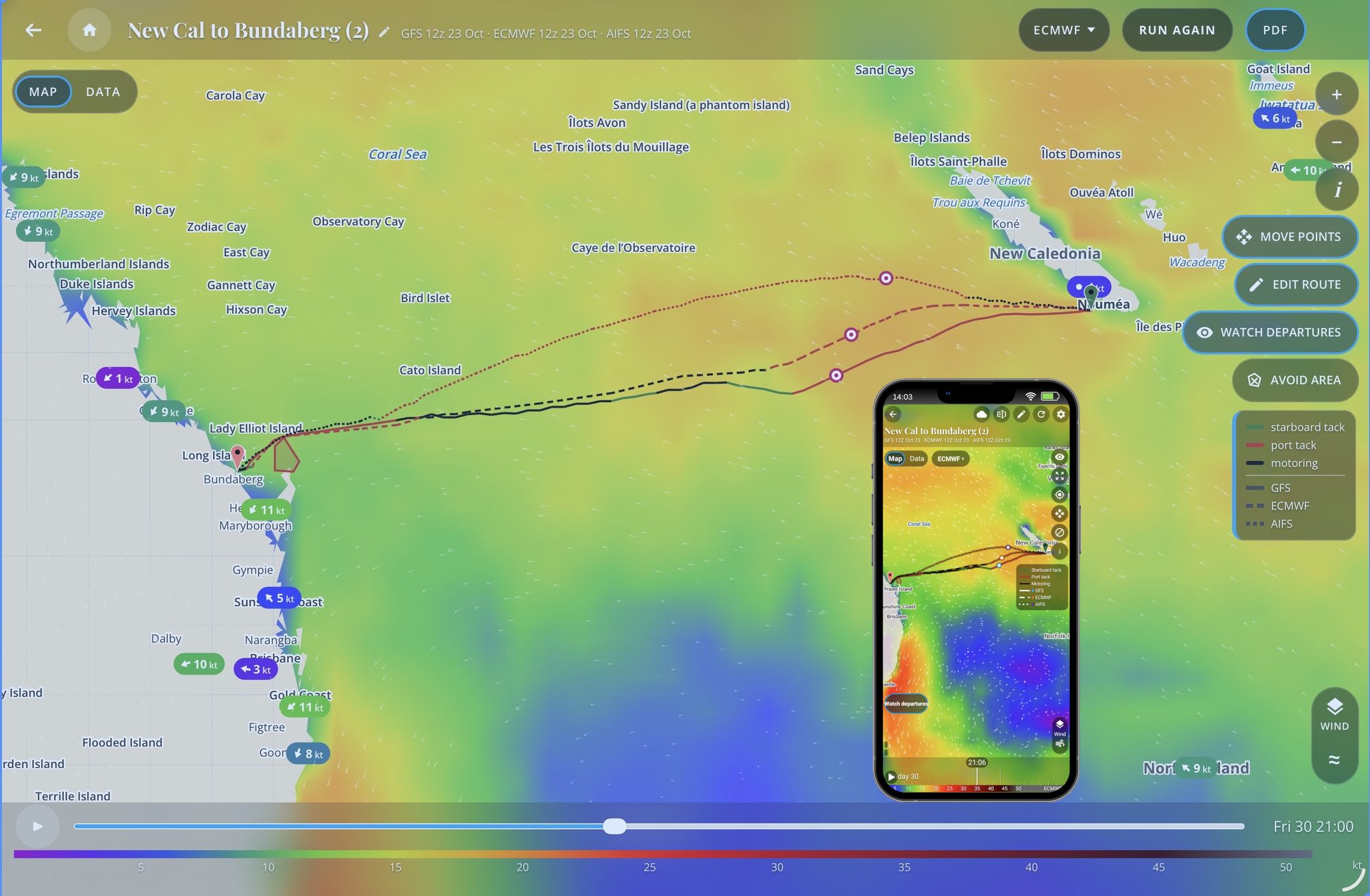
Web, Android and iPhone share the boat, polars, routes and watches.
The details
- Follows your membership
- Your boat (hull, length, polar, day and night percentages, motor speeds, fuel use, the Wave polar's figures, sailing angles, depth, the wind limit and the wave limits by side), units and times, uploaded polars, avoid areas, saved routes, planner trips and watches, and your Terms of use acceptance.
- Stays on each device
- Theme, map layer choices, satellite, the Observed and ASCAT settings, table columns and map position.
- What's New
- A short note of what changed, the first time a new build of the app opens.
- Notices
- Messages from us in the apps and on the web, such as planned maintenance.
- Newer run, Load it
- When a newer forecast run arrives while the map is open, the web edition says so, and Load it brings it in without a reload.
Your boat, your limits
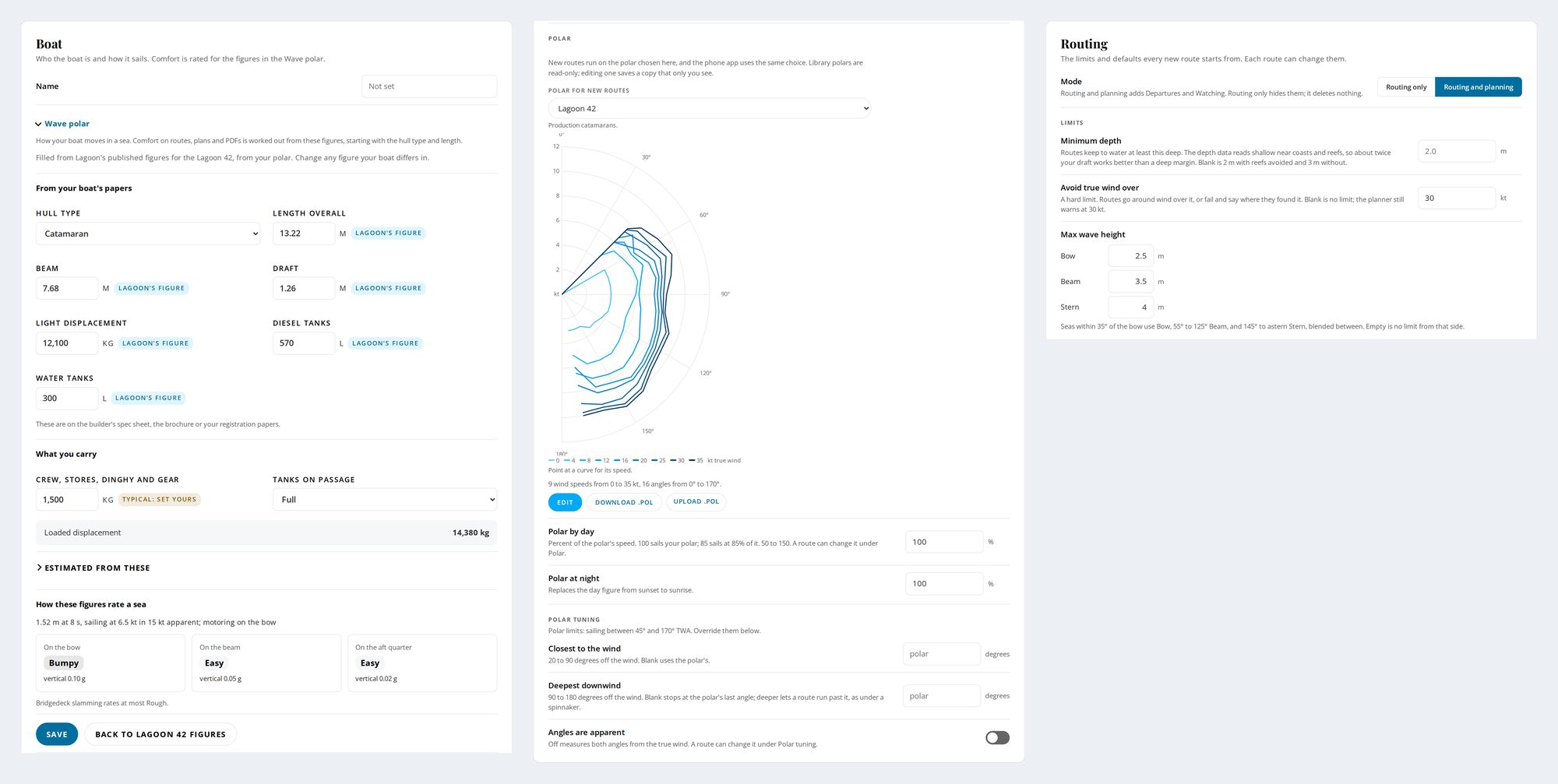
Your polar from a library of 189 or your own file, your wind and wave limits, your sailing angles, and whether you'd rather sail than motor.
The details
- Your boat's polar
- Pick from a library of 189 polars, upload your own .pol file, or edit one in 5 degree steps. Day and night percentages can be set to match your sailing style.
- Sailing angles and limits
- Your closest angle to the wind and deepest downwind angle, plus the maximum wind and the highest seas for the bow, the beam and the stern, judged at the angle the seas meet the boat. A route that can't stay inside them says where and when it would exceed them. When a wave limit stops a route, the message says so and offers to run it again without wave limits.
- Motoring
- Enter your boat's speed under engine in a calm, and at 25 and 35 kt of wind by angle. With Prefer sailing on, the default, the engine runs only where it's at least 30% faster than sailing. Motor below sets a sailing speed under which the boat motors. Any route can be sail only.
- Send us your polar
- Send us your polar in whatever form you have it, such as a PDF, an image, a scan or a spreadsheet. We convert it by hand and, if you agree, add it to the library.
- Wave polar
- Your boat's length, beam, draft and displacement, filled in from the builder's published figures where we have them, or typical figures for your type and length. Comfort is rated from them.
Built aboard, and used on passage
Sereno Routing is built by the crew of S/V Sabado, a Lagoon 42 in the South Pacific, from 40 years of engineering and boating. It's what we use to decide when to go.
Whilst I'd get much the same outcome it takes me hours and hours to prepare a passage - your app makes light work of it!
This is the most comprehensive and intuitive routing application I've ever used. Thank you Sabado for developing such a great app.
Free until 31 December 2026
Sereno Routing is open to anyone with a free svsabado.com membership until 31 December 2026. Sign up free and start routing today.
Sereno Weather Routing, $250 a year. Weather routing, plus everything in VIP:
- Everything in Crew: subscriber-only content, the Document Library, live tracking of Sabado, real-time updates, and early, ad-free videos.
- Priority responses from Ray & Holly.
Or try it free until 31 December 2026 with a free svsabado.com membership
How signing in works
You sign in with your svsabado.com membership. There's no separate password to remember.
- Sign up. Press "Get Sereno Weather Routing" or the free link. It takes you to svsabado.com, our sailing site. Your bank statement will say "svsabado".
- Check your email. We send you an email. Tap the link in it.
- Open Sereno Routing and tap Sign in. If we send you another email, tap that link too, and you're in.
On an Android phone, step 3 is a little different. In Sereno Routing, go to Settings, then Account, then Membership sign-in, and follow the steps. You'll copy a short code from our site into the app. Type it in soon, because it only lasts 10 minutes.
Tip: open each email on the same phone or computer you're signing in on, and within 15 minutes.
What it isn't for
Sereno Routing is for planning a passage, not for navigating by. It's in beta. Dense reef can defeat a router, Sereno included, so check the chart.